
Gallup's research captures the tension well: fully remote workers show the highest engagement rates at 31%, yet 45% felt significant stress the previous day. Remote work creates real advantages — and real management challenges — simultaneously.
This guide gives entrepreneurs and small business owners a practical framework for managing remote teams effectively. We'll cover setting expectations, communicating intentionally, tracking performance without micromanaging, and the tools that make distributed work less friction-heavy.
Key Takeaways
- Clear, documented expectations matter more than any tool or meeting cadence
- Mix synchronous and async communication — more video calls is not the answer
- Track outcomes and deliverables, not hours or screen activity
- Trust grows from consistency and autonomy, not surveillance
- Hiring qualified, role-matched remote talent from the start reduces management friction and speeds up onboarding
The Biggest Challenges of Managing Remote Teams
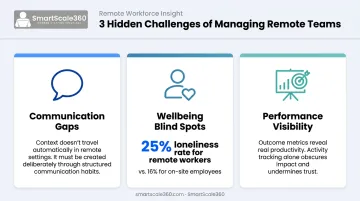
Remote work doesn't eliminate management problems — it relocates and amplifies them. Three friction points emerge consistently:
- Communication gaps — Without hallway conversations or impromptu desk check-ins, small misalignments compound quickly. Context that would travel naturally in an office has to be created deliberately.
- Wellbeing blind spots — You can't observe fatigue, frustration, or burnout through a screen. Gallup found fully remote workers experience loneliness at 25%, compared with 16% for on-site staff — a gap that widens when managers don't build connection intentionally.
- Performance visibility — Knowing who's productive without watching their every move requires clear deliverables and outcome metrics, not activity tracking.
Time Zones, Fragmentation, and the Compounding Effect
For businesses working with offshore staff, scheduling complexity deserves its own attention. Harvard Business School research found that each additional hour of time zone difference reduced real-time communication by 11% and cut workday overlap by 19%. Misaligned availability delays decisions and creates bottlenecks — especially if the team defaults to waiting for live meetings to resolve things that could be handled asynchronously.
Those scheduling gaps feed a quieter problem: fragmentation. When remote employees feel disconnected from company goals — or from each other — engagement drops before anyone notices. By the time it surfaces, someone has already disengaged or a project has quietly derailed. The tips below target each of these friction points with practical fixes.
Setting Clear Expectations and Workflows for Remote Success
Start With Clarity, Not Tools
Before choosing a project management platform or scheduling weekly standups, every remote team member needs three things defined:
- What they own
- What success looks like
- When deliverables are due
Vague expectations are painful in any setting. In remote environments, they're disruptive, since there's no manager nearby to catch the confusion before it causes delays. Gallup found that fully remote employees' role clarity reached 82% when they understood what their coworkers were responsible for. That clarity doesn't happen accidentally.
Document Everything
Tools like Asana or Trello let you build project roadmaps where each person can see how their work connects to the bigger picture. Written role descriptions, decision logs, and project briefs serve two purposes: they keep current work aligned, and they dramatically reduce the time it takes to onboard new team members.
GitLab — an all-remote company — built an async work handbook that would exceed 2,000 pages if printed. You don't need that. But a lightweight SMB version covering role boundaries, decision rights, and handoff notes is worth every hour it takes to create.
Shift From Activity to Outcomes
SMART goals and OKRs (Objectives and Key Results) give remote managers a way to evaluate performance on results, not hours logged. The shift matters: output-based management builds trust, while activity-based monitoring breeds resentment.
Among remote workers who found career growth accessible, 75% credited being measured on output and impact rather than presence, according to Buffer's State of Remote Work research.
Create a "Ways of Working" Document
A living guide that outlines:
- Preferred tools for different conversation types
- Response time expectations
- Availability windows
- Meeting norms and communication etiquette
This document is especially critical for globally distributed teams where norms aren't shared by default. Done well, it gives everyone a shared operating system — so async work runs on agreement, not assumption.
Expectation-setting also gets easier when new remote staff arrive already matched to your role requirements. SmartScale360 screens candidates for skills, English proficiency, and role fit before placement, so the time between hire and full productivity stays short.
Communication and Connection in a Remote Environment
Synchronous vs. Asynchronous: Know the Difference
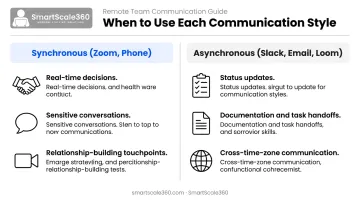
Not every conversation needs a meeting. A useful rule of thumb:
| Use synchronous (Zoom, phone) for: | Use asynchronous (Slack, email, Loom) for: |
|---|---|
| Decisions requiring real-time input | Status updates and routine check-ins |
| Sensitive or complex conversations | Documentation and task handoffs |
| Relationship-building touchpoints | Cross-time-zone team communication |
Stanford research identified four measurable causes of Zoom fatigue — excessive eye contact, constant self-view, reduced mobility, and higher cognitive load. Over-relying on video calls doesn't increase connection; it increases exhaustion.
Structure Your Check-Ins
Two recurring meetings cover most remote management needs:
- Weekly team standup — align on priorities, surface blockers, keep everyone oriented to shared goals
- Regular one-on-ones — review progress, discuss development, and include some non-work conversation to replace what in-person offices provide naturally
One-on-ones are particularly valuable because they create a private space to catch problems before they escalate.
Practice Intentional Inclusion
In virtual meetings, the loudest voices tend to dominate. Counter this by:
- Sharing agendas in advance so everyone can prepare
- Actively calling on quieter team members by name
- Sending a written recap after every meeting with decisions made and action items assigned
Build Culture Deliberately
Remote teams don't develop social fabric by accident. You have to build it deliberately. Some options that work:
- A brief personal check-in at the start of team meetings ("share one thing from your weekend")
- Non-work Slack channels like #wins or #hobbies
- Occasional virtual social events — coffee chats, game nights, or low-key hangouts
Microsoft research found 66% of remote employees said informal coffee chats helped build connection. Treat these touchpoints as a standard part of how your team operates — not optional additions to a busy schedule.
Tracking Performance and Accountability Without Micromanaging
The Surveillance Problem
Employee monitoring feels logical when you can't physically see your team — but the data shows it backfires. The APA found that 56% of monitored workers felt tense or stressed, compared to lower stress levels among non-monitored workers. Monitored employees were also more likely to report poor mental health: 32% vs. 24%.
Trust erodes fast when people feel watched rather than trusted.
What to Track Instead
Structure performance visibility around deliverables and outcomes:
- Define clear, measurable deliverables for each role
- Set review cadences — weekly progress checks, monthly one-on-ones, quarterly reviews
- Use shared project management tools (Asana, Monday.com, Notion) so status is visible without constant status requests
- Score work on quality, deadlines, and customer outcomes — not hours online
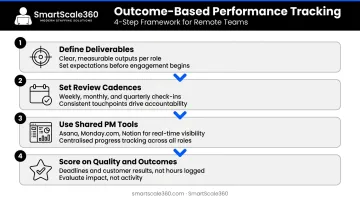
When the scoreboard is built around outcomes, performance conversations become easier — and less personal.
Address Problems Early
Remote settings create a particular risk: issues can go unaddressed for too long because there's no visible signal. A missed deadline or declining output should prompt a private conversation within days — not weeks.
Check-ins are the right place to find out what's actually going on. Common culprits include:
- Unclear priorities or shifting workloads
- Blockers the person hasn't escalated
- Early-stage burnout
Catching these early prevents small problems from turning into departures.
Use Feedback Loops
Gallup found employees are more likely to be engaged when manager feedback happens a few times a week — yet most managers operate far below that frequency. Pulse surveys (short, regular check-ins on morale and engagement) help managers read the room without waiting for problems to surface on their own.
Pulse surveys only capture half the picture. Asking team members directly — "what can I do better as your manager?" — closes the loop and builds the psychological safety remote teams need to perform well.
Essential Tools for Managing Remote Teams
The Core Stack
Remote teams need three tool categories to function well:
Communication:
- Team messaging: Slack (38M+ active users) or Microsoft Teams (320M monthly active users)
- Video conferencing: Zoom or Google Meet
- Async video updates: Loom (25M+ registered users) for walkthroughs and detailed explanations that don't require a live meeting
Project and workflow management:
- Asana, Trello, Monday.com, or Notion for task tracking, timelines, and shared documentation
- A visible workflow removes the need for constant status updates — everyone can see where things stand
Documentation:
- A shared workspace (a dedicated wiki or knowledge base) for role descriptions, SOPs, decision logs, and your "ways of working" document
Avoid Tool Overload
The tool stack itself can become the problem. Okta found SMBs use an average of 58 apps, while Asana reported workers spend 60% of their time on "work about work" — status updates, searching for information, switching between tools.
More tools don't equal more productivity. Pick a small core stack, define which tool owns which type of conversation, and audit it quarterly. When every tool has a clear job, your team spends less time managing the system and more time doing the work.
Frequently Asked Questions
How do you manage a remote team?
Set clear expectations and documented workflows first, then communicate with a deliberate mix of synchronous and asynchronous tools. Track results over activity, and invest consistently in team trust and connection — these aren't one-time efforts but ongoing management habits.
What is a key challenge of managing remote teams?
Communication gaps are the most common issue. Without informal office interactions, small misalignments go unnoticed and compound over time. Structured check-ins and clear written communication norms address this before misunderstandings turn into disengagement.
What are the best tools for managing remote teams?
Cover three categories: a messaging platform (Slack or Teams), a video tool (Zoom or Google Meet), and a project management system (Asana, Trello, or Notion). Specific tools matter less than using them consistently and agreeing on which tool handles which type of communication.
How do you build trust with remote employees?
Give team members real autonomy over how they do their work, share updates proactively, follow through on your commitments, and recognize wins publicly. Trust is cumulative — it builds through small, repeated actions over time.
How do you track the performance of remote workers?
Shift from tracking hours to tracking outcomes. Define clear deliverables for each role, use shared project management tools to create visibility, and hold regular review conversations. Clear goals and consistent feedback drive performance far better than surveillance metrics.